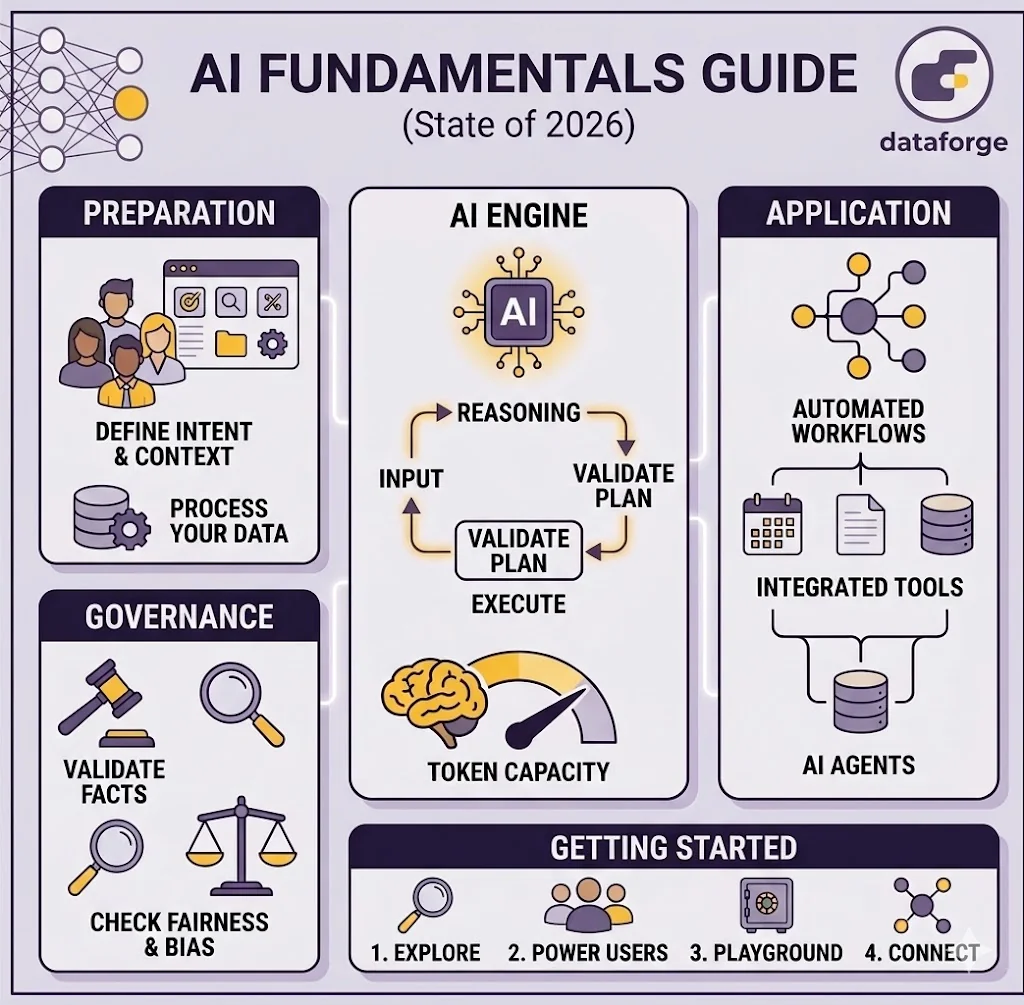
AI Basics for New Users: Essential Knowledge List
Important note: This guide reflects the current state of AI as of April 2026. The AI industry is rapidly evolving. New models are released regularly, pricing changes frequently, and capabilities improve constantly. The examples and information here will become outdated. Check official sources for the latest models, pricing, and features before making decisions based on this guide.
This guide covers the fundamentals you need to use AI effectively. We'll walk through how AI works, what it costs, and how to get good results. You'll also learn how to build workflows that combine AI with code and tools to save time and money.
What is an LLM and How Does It Work?
An LLM (Large Language Model) is AI software trained on billions of words from the internet. It learned patterns about how language works by reading all that text, so it can predict what word comes next based on what you've already written.
Think of it like this: if you've read thousands of books, you develop an intuition for how stories flow, how arguments are structured, and what makes sense to write next. An LLM does the same thing, but with vastly more data. When you type a question or request, the LLM reads your words and generates a response one word at a time, always predicting the most likely next word based on everything it learned.
1. Mindset: Gather, Plan, Execute
The most effective approach to AI is linear and structured. You can start with a simple question to get a framework from the AI, but from there you must do the rest yourself. Gather the context you need, create a plan, then execute it step by step.
This approach works because AI performs better with clear boundaries and explicit instructions. The more control you maintain over the process, the more reliable your results. Think of it like building something—you get initial guidance, but the execution requires your direction and oversight.
This mindset applies whether you're writing a single prompt or building an automated workflow. Get the framework from AI, then gather what the AI needs to know. Create a detailed plan you can review and refine. Finally, execute that plan in clear steps. You'll get better results, fewer surprises, and lower costs.
- Start with a simple question - Get a framework or initial structure from AI
- Collect context - Gather all background, requirements, and relevant information based on that framework
- Plan - Have the AI create a detailed plan you can review and refine
- Execute - Break execution into small, verifiable steps rather than one big request
2. Understanding Context Windows
Think of a context window as your AI's working memory. It's how much text the AI can actually process at one time. Just like you can't remember a book you read six months ago, AI forgets earlier parts of conversations if they go on too long. A bigger context window means longer conversations without the AI losing the thread.
- Measured in tokens - roughly 1.5 tokens per word (so a 200,000 token window ≈ 133,000 words)
- Models vary widely - GPT-4o handles 128,000 tokens, while Gemini 1.5 Pro goes up to 2 million
- More isn't always better - Larger windows cost more money and can sometimes make responses worse in the middle sections
- Know your limits - If your AI only handles 50 pages, uploading a 500-page document won't work
3. AI Models & Pricing
There are tons of AI models available, and costs vary wildly. Some are free, others charge based on usage. The good news: you don't need the most expensive model for most jobs.
- Free options exist - Over 20 models are available at no cost (though often with restrictions)
- Pricing ranges significantly - from free up to $150+ per million input tokens
- Output costs more than input - generating text is computationally harder than reading it
- Popular paid options: GPT-4o ($0.003/1K tokens), Claude 3.5 Sonnet ($0.003/1K tokens), Gemini 1.5 Pro (tiered pricing)
- Match model to task - Use expensive frontier models for planning, troubleshooting, and complex reasoning. Use cheaper models for execution, repetitive tasks, and routine operations. This can cut costs by 90% while maintaining quality where it matters.
4. Data Exploration
One of the most powerful uses of AI is exploring large documents and datasets on your own. You can upload files—research papers, spreadsheets, reports, databases—and ask AI to help you understand them. Instead of manually reading through hundreds of pages, AI can quickly highlight patterns, summarize findings, and answer specific questions about your data.
This is especially useful when you're unfamiliar with a dataset or need to find specific information buried in large documents. AI can compare data across files, identify trends, extract key information, and answer follow-up questions in real time.
- Upload documents and datasets - Share files directly with AI to analyze them
- Ask questions about your data - "What are the top 5 trends?" "Where are the gaps?" "Summarize the methodology"
- Faster than manual review - Get insights in minutes instead of hours of reading
- Iterative exploration - Ask follow-up questions to dig deeper into specific areas
- Works across formats - PDFs, CSV files, spreadsheets, text documents, and more
5. Model Context Protocol (MCP)
MCP is an emerging standard that connects AI tools to your other applications and data. Think of it as a universal connector—once plugged in, your AI can access your calendar, files, databases, and other services directly.
- Direct access to your data - No more copying and pasting. MCP lets AI pull from Google Calendar, Notion, databases, and documents on the fly
- Hands-off automation - AI can search the web, run calculations, or trigger actions without manual intervention
- Developer-friendly - Integrates with VS Code, Cursor, and other development platforms
- Still developing - MCP is new. Not all platforms support it yet, but adoption is growing
6. Temperature & Sampling Parameters
Temperature controls how creative or consistent your AI's responses are. It's a dial: set it low for reliable, factual answers, or high for creative, varied ones.
- Low (0-0.3) - Factual, consistent responses. Use this for customer service, research, coding
- High (0.7-1.0) - Creative, variable outputs. Better for brainstorming, fiction writing, exploring ideas
- Most defaults sit in the middle - Usually around 0.7, which works well for general use
- You can adjust it - Don't stick with defaults if they're not working for your use case
7. AI Hallucinations & How to Spot Them
Occasionally, AI invents information with complete confidence. It might cite papers that don't exist, fabricate statistics, or describe events that never happened. This is called a hallucination, and it's a real problem.
- Confidence is misleading - AI sounds equally sure about made-up facts as real ones
- This has real costs - Lawyers have cited non-existent court cases using ChatGPT, causing actual legal problems
- Worse with niche topics - AI struggles most with recent events or obscure subjects where training data is limited
- How to mitigate: verify sources, use fact-checking tools, lower temperature for factual work, and have code validate outputs before they're used
8. Bias in AI
AI models inherit biases from their training data—the billions of internet pages they learn from. This shows up as gender bias, racial bias, and political bias in responses. It's not theoretical; it affects real decisions in hiring, lending, and customer service.
- Source of the problem - Training data includes human prejudices and inaccuracies from the internet
- Shows up unexpectedly - A model might consistently refuse certain requests or give different advice based on implied demographics
- Varies by model - Some models are trained to be more careful about fairness than others
- Stay skeptical - Treat AI outputs as one input among many, especially for decisions that matter
9. Prompt Planning Before Execution
A well-structured prompt gets better results faster. Lead with your intent and what you want to accomplish, then provide the context the AI needs to help you. Spend time planning what you ask instead of trial-and-error back-and-forth.
- Start with intent - Be clear about what you want to achieve and why. Tell the AI your goal upfront
- Then add context - Explain your role, who your audience is, any relevant background, and what success looks like
- Use examples - Show the AI examples of good and bad answers. This improves results significantly
- Specify tone - Do you want formal or casual? Direct or diplomatic? Be explicit
- Define the format - Tell the AI whether you want bullet points, paragraphs, a table, or something else
10. Translations & Transformations
AI excels at taking data in one form and presenting it exactly how you need it. Whether you're translating between languages, converting formats, or restructuring information, AI can handle it quickly and accurately.
- Format conversion - Turn a paragraph into a bulleted list, a CSV into a table, code in one language to another
- Summarization - Condense long documents, articles, or reports into key points or executive summaries
- Data restructuring - Take unstructured information and organize it into a specific format you need
- Language translation - Convert text between languages while maintaining meaning and tone
- Style transformation - Rewrite technical content for a general audience, or vice versa
11. AI Agents
An agent is an AI system that can plan, make decisions, and take actions on its own using available tools. Instead of you directing every step, you tell the agent what to accomplish and it figures out how to do it.
Agents are useful for complex, multi-step tasks where you don't want to manually guide each stage. They work well for code generation, bug fixes, file management, and workflows that require decision-making.
- How they work - You give an agent a goal, it breaks the goal into steps, uses available tools to execute those steps, and adjusts based on results
- Better for complex tasks - Use agents when a task requires multiple decisions or tool uses. For simple requests, a direct prompt is faster
- Limited by available tools - An agent can only use tools you give it access to. The more connected your data and systems, the more powerful the agent
- Still developing - Agent capabilities vary widely between platforms. Test them on your specific use cases before relying on them
12. Tools & What They Do
In AI terminology, "tools" means capabilities beyond text generation. Tools let AI take actions, retrieve live information, and connect to your other software.
- Common examples - web search, file creation, calculations, database queries, API calls
- Varies by platform - Not all AI services have the same tools. Check what's available before committing
- Enables real workflows - With tools, AI can complete end-to-end tasks instead of just providing information
- MCP is the emerging standard - It makes it easier for different platforms to access the same tools
13. Markdown Files & Documentation
Markdown is the standard formatting language for AI platforms. Learning the basics takes 10 minutes and makes your work cleaner and more usable.
- Simple syntax - Headers, bold text, lists, code blocks. That's most of it
- AI platforms are built around it - Proper formatting gets you better results
- Makes output readable - Formatted responses are easier to scan, copy, and use elsewhere
- Works everywhere - ChatGPT, Claude, Gemini, and other tools all use markdown
14. AI Workflows: Combining AI + Code + Tools
The real power isn't in asking questions—it's in building workflows that combine AI's reasoning with code's precision and tools' integrations.
- Separate the work - Let AI handle analysis and planning, let code handle reliable execution
- Lower costs significantly - A workflow automating customer support routing might cost $5 a day instead of $240 in manual work
- Built-in error catching - Code can verify AI outputs before they go anywhere, preventing mistakes
- Break tasks into stages - Don't ask AI to do everything at once. Instead: explore → plan → implement → verify
- Integrations close the loop - Without them, you're stuck copying and pasting. With tools, workflows run automatically
- Use the right model for each step - Let expensive frontier models handle planning and troubleshooting. Use cheaper models for execution, data processing, and repetitive tasks. This layered approach dramatically reduces costs while keeping quality high where it matters.
Quick Takeaway
You now understand the main constraints (context windows), costs (variable pricing), tools to make AI better (good prompts and planning), and how to build workflows that save time and money. Whether you're using a simple prompt or building an automated agent-based workflow, the fundamentals remain the same: clear intent, good planning, and proper execution.
AI Terms & Quick Definitions
Agent - An AI system that can plan, use tools, and take actions autonomously to accomplish multi-step tasks.
Bias - When AI produces outputs that reflect prejudices or inaccuracies from its training data (gender, racial, political bias, etc.).
Context Window - The amount of text (measured in tokens) that an AI model can process at one time. Also called context length.
Frontier Models - The most advanced AI models available at any given time, representing the cutting edge of AI capability. Frontier models have the highest performance but also the highest cost. Examples include Claude 3.5 Opus, GPT-4o, and Gemini 1.5 Pro. New frontier models are constantly being released as companies push the boundaries of what's possible.
Hallucination - When AI confidently generates false information, such as fake citations, made-up statistics, or events that never happened.
LLM (Large Language Model) - AI software trained on billions of words to recognize patterns in language and predict what text comes next.
Markdown - A simple text formatting language using symbols like # for headers, ** for bold, and - for lists. Standard for AI platforms.
MCP (Model Context Protocol) - An open standard that connects AI tools to external applications, data sources, and services.
Model - A trained AI system that has learned patterns from data and can generate text, answer questions, or perform tasks.
RAG (Retrieval-Augmented Generation) - A technique where AI retrieves relevant information from external sources before generating an answer, improving accuracy.
Temperature - A setting that controls how creative or consistent AI responses are. Low temperature (0-0.3) for factual answers, high (0.7-1.0) for creative ones.
Token - A unit of text that an AI processes. Roughly 1.5 tokens per word, but varies by language and model.
Tool - A capability that lets AI take actions beyond text generation, such as web search, file creation, or API calls.
Workflow - A structured process that combines AI reasoning with code execution and tool integrations to automate complex tasks.
Getting Started: Your First Steps With AI
The best way to learn AI is by doing. Here's a practical four-step approach to get started immediately:
1. Exploration
Start by exploring what AI can do without commitment or technical setup. Get hands-on with existing AI tools to understand capabilities and limitations.
- Try Claude, ChatGPT, or Gemini with real tasks you care about
- Upload documents and ask questions about them
- Experiment with different prompts and notice what works
- Play with temperature settings and observe output differences
- This phase builds intuition about how AI actually behaves in practice
2. Develop Power Users
Identify people on your team or in your organization who will become your AI experts—your "power users." These are the people who will push boundaries and share knowledge with others.
- Have power users spend focused time exploring AI tools deeply
- Encourage them to find use cases specific to your work
- Have them document what works, what doesn't, and why
- Create a feedback loop where power users share discoveries with the wider group
- This creates distributed expertise instead of relying on single experts
3. Playground: Let Them Experiment
Give power users a safe space to experiment with connected tools and real (or realistic) data. This is where learning accelerates because they're working with actual problems.
- Set up a sandbox environment where they can test AI workflows
- Let them combine AI with their existing tools and processes
- Encourage iteration and "breaking things" safely
- Track what experiments work and what doesn't
- Use successes as templates for broader rollout
4. Connect Read-Only Integrations
Once you've identified what works, start connecting AI tools to your data sources. Begin with read-only access to understand how integration flows before enabling write access.
- Connect AI to databases, documents, or APIs for data exploration
- Start with read-only permissions to prevent accidental changes
- Let power users pull real data into AI for analysis
- Observe how this changes workflows and what new questions get asked
- This bridges the gap between playing with AI and using it in real systems
The Key Principle: This four-step approach moves from curiosity to competence to integration. You're not forcing AI adoption; you're letting people discover value organically, then scaling what works. This creates better buy-in, faster learning, and more sustainable AI practices.
Post Images
Click to view larger